Web Application
古典的 3 層ウェブアプリケーション
プレゼンテーション層、アプリケーション層、データベース層をネットワーク的に分離し、堅牢なセキュリティと可用性を備えた 3 層構造を構築します。
構成要素 (AWS Services):
EC2ALBRDSVPCSecurity Group
アーキテクチャ図 (Architecture Diagram)
クリックで拡大表示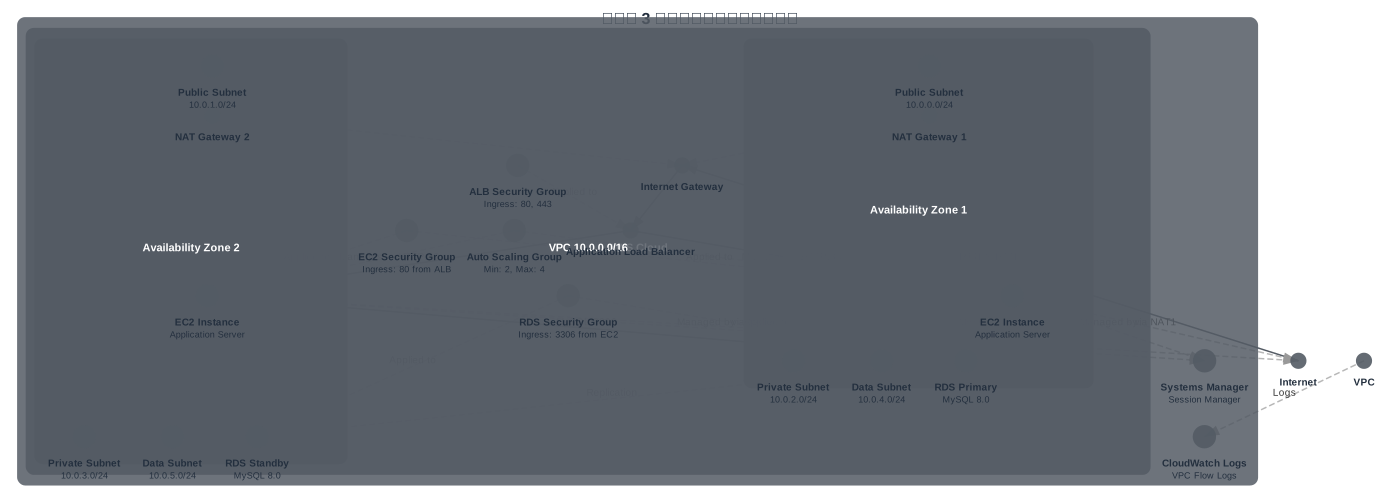
AWS CLI でのデプロイ例
AWS CLIを使用してCloudFormationスタックをデプロイする場合は、以下のコマンドを実行します。
aws cloudformation create-stack \
  --stack-name three-tier-architecture-stack \
  --template-body file://three-tier-architecture.yaml \
  --capabilities CAPABILITY_IAM
three-tier-architecture.yaml
AWSTemplateFormatVersion: '2010-09-09'
Description: 'Three-tier architecture with VPC, ALB, EC2, and RDS following AWS best practices'

Parameters:
  LatestAmiId:
    Type: AWS::SSM::Parameter::Value<AWS::EC2::Image::Id>
    Default: /aws/service/ami-amazon-linux-latest/al2023-ami-kernel-default-x86_64

  DBUsername:
    Type: String
    Default: admin
    NoEcho: true

  DBPassword:
    Type: String
    NoEcho: true
    MinLength: 8

Mappings:
  SubnetConfig:
    VPC:
      CIDR: 10.0.0.0/16
    PublicOne:
      CIDR: 10.0.0.0/24
    PublicTwo:
      CIDR: 10.0.1.0/24
    PrivateOne:
      CIDR: 10.0.2.0/24
    PrivateTwo:
      CIDR: 10.0.3.0/24
    DataOne:
      CIDR: 10.0.4.0/24
    DataTwo:
      CIDR: 10.0.5.0/24

Resources:
  # VPC
  VPC:
    Type: AWS::EC2::VPC
    Properties:
      EnableDnsSupport: true
      EnableDnsHostnames: true
      CidrBlock: !FindInMap [SubnetConfig, VPC, CIDR]
      Tags:
        - Key: Name
          Value: ThreeTierVPC

  # Public Subnets
  PublicSubnetOne:
    Type: AWS::EC2::Subnet
    Properties:
      AvailabilityZone: !Select [0, !GetAZs '']
      VpcId: !Ref VPC
      CidrBlock: !FindInMap [SubnetConfig, PublicOne, CIDR]
      MapPublicIpOnLaunch: true
      Tags:
        - Key: Name
          Value: PublicSubnet1

  PublicSubnetTwo:
    Type: AWS::EC2::Subnet
    Properties:
      AvailabilityZone: !Select [1, !GetAZs '']
      VpcId: !Ref VPC
      CidrBlock: !FindInMap [SubnetConfig, PublicTwo, CIDR]
      MapPublicIpOnLaunch: true
      Tags:
        - Key: Name
          Value: PublicSubnet2

  # Private Subnets (Application Tier)
  PrivateSubnetOne:
    Type: AWS::EC2::Subnet
    Properties:
      AvailabilityZone: !Select [0, !GetAZs '']
      VpcId: !Ref VPC
      CidrBlock: !FindInMap [SubnetConfig, PrivateOne, CIDR]
      Tags:
        - Key: Name
          Value: PrivateSubnet1

  PrivateSubnetTwo:
    Type: AWS::EC2::Subnet
    Properties:
      AvailabilityZone: !Select [1, !GetAZs '']
      VpcId: !Ref VPC
      CidrBlock: !FindInMap [SubnetConfig, PrivateTwo, CIDR]
      Tags:
        - Key: Name
          Value: PrivateSubnet2

  # Data Subnets (Database Tier)
  DataSubnetOne:
    Type: AWS::EC2::Subnet
    Properties:
      AvailabilityZone: !Select [0, !GetAZs '']
      VpcId: !Ref VPC
      CidrBlock: !FindInMap [SubnetConfig, DataOne, CIDR]
      Tags:
        - Key: Name
          Value: DataSubnet1

  DataSubnetTwo:
    Type: AWS::EC2::Subnet
    Properties:
      AvailabilityZone: !Select [1, !GetAZs '']
      VpcId: !Ref VPC
      CidrBlock: !FindInMap [SubnetConfig, DataTwo, CIDR]
      Tags:
        - Key: Name
          Value: DataSubnet2

  # Internet Gateway
  InternetGateway:
    Type: AWS::EC2::InternetGateway
    Properties:
      Tags:
        - Key: Name
          Value: ThreeTierIGW

  GatewayAttachment:
    Type: AWS::EC2::VPCGatewayAttachment
    Properties:
      VpcId: !Ref VPC
      InternetGatewayId: !Ref InternetGateway

  # NAT Gateways
  NatGatewayOneEIP:
    Type: AWS::EC2::EIP
    DependsOn: GatewayAttachment
    Properties:
      Domain: vpc

  NatGatewayTwoEIP:
    Type: AWS::EC2::EIP
    DependsOn: GatewayAttachment
    Properties:
      Domain: vpc

  NatGatewayOne:
    Type: AWS::EC2::NatGateway
    Properties:
      AllocationId: !GetAtt NatGatewayOneEIP.AllocationId
      SubnetId: !Ref PublicSubnetOne
      Tags:
        - Key: Name
          Value: NatGateway1

  NatGatewayTwo:
    Type: AWS::EC2::NatGateway
    Properties:
      AllocationId: !GetAtt NatGatewayTwoEIP.AllocationId
      SubnetId: !Ref PublicSubnetTwo
      Tags:
        - Key: Name
          Value: NatGateway2

  # Route Tables
  PublicRouteTable:
    Type: AWS::EC2::RouteTable
    Properties:
      VpcId: !Ref VPC
      Tags:
        - Key: Name
          Value: PublicRouteTable

  PublicRoute:
    Type: AWS::EC2::Route
    DependsOn: GatewayAttachment
    Properties:
      RouteTableId: !Ref PublicRouteTable
      DestinationCidrBlock: 0.0.0.0/0
      GatewayId: !Ref InternetGateway

  PublicSubnetOneRouteTableAssociation:
    Type: AWS::EC2::SubnetRouteTableAssociation
    Properties:
      SubnetId: !Ref PublicSubnetOne
      RouteTableId: !Ref PublicRouteTable

  PublicSubnetTwoRouteTableAssociation:
    Type: AWS::EC2::SubnetRouteTableAssociation
    Properties:
      SubnetId: !Ref PublicSubnetTwo
      RouteTableId: !Ref PublicRouteTable

  PrivateRouteTableOne:
    Type: AWS::EC2::RouteTable
    Properties:
      VpcId: !Ref VPC
      Tags:
        - Key: Name
          Value: PrivateRouteTable1

  PrivateRouteOne:
    Type: AWS::EC2::Route
    Properties:
      RouteTableId: !Ref PrivateRouteTableOne
      DestinationCidrBlock: 0.0.0.0/0
      NatGatewayId: !Ref NatGatewayOne

  PrivateSubnetOneRouteTableAssociation:
    Type: AWS::EC2::SubnetRouteTableAssociation
    Properties:
      SubnetId: !Ref PrivateSubnetOne
      RouteTableId: !Ref PrivateRouteTableOne

  PrivateRouteTableTwo:
    Type: AWS::EC2::RouteTable
    Properties:
      VpcId: !Ref VPC
      Tags:
        - Key: Name
          Value: PrivateRouteTable2

  PrivateRouteTwo:
    Type: AWS::EC2::Route
    Properties:
      RouteTableId: !Ref PrivateRouteTableTwo
      DestinationCidrBlock: 0.0.0.0/0
      NatGatewayId: !Ref NatGatewayTwo

  PrivateSubnetTwoRouteTableAssociation:
    Type: AWS::EC2::SubnetRouteTableAssociation
    Properties:
      SubnetId: !Ref PrivateSubnetTwo
      RouteTableId: !Ref PrivateRouteTableTwo

  DataRouteTable:
    Type: AWS::EC2::RouteTable
    Properties:
      VpcId: !Ref VPC
      Tags:
        - Key: Name
          Value: DataRouteTable

  DataSubnetOneRouteTableAssociation:
    Type: AWS::EC2::SubnetRouteTableAssociation
    Properties:
      SubnetId: !Ref DataSubnetOne
      RouteTableId: !Ref DataRouteTable

  DataSubnetTwoRouteTableAssociation:
    Type: AWS::EC2::SubnetRouteTableAssociation
    Properties:
      SubnetId: !Ref DataSubnetTwo
      RouteTableId: !Ref DataRouteTable

  # Security Groups
  ALBSecurityGroup:
    Type: AWS::EC2::SecurityGroup
    Properties:
      GroupDescription: Security group for Application Load Balancer
      VpcId: !Ref VPC
      SecurityGroupIngress:
        - IpProtocol: tcp
          FromPort: 80
          ToPort: 80
          CidrIp: 0.0.0.0/0
        - IpProtocol: tcp
          FromPort: 443
          ToPort: 443
          CidrIp: 0.0.0.0/0
      Tags:
        - Key: Name
          Value: ALBSecurityGroup

  EC2SecurityGroup:
    Type: AWS::EC2::SecurityGroup
    Properties:
      GroupDescription: Security group for EC2 instances
      VpcId: !Ref VPC
      SecurityGroupIngress:
        - IpProtocol: tcp
          FromPort: 80
          ToPort: 80
          SourceSecurityGroupId: !Ref ALBSecurityGroup
      Tags:
        - Key: Name
          Value: EC2SecurityGroup

  RDSSecurityGroup:
    Type: AWS::EC2::SecurityGroup
    Properties:
      GroupDescription: Security group for RDS database
      VpcId: !Ref VPC
      SecurityGroupIngress:
        - IpProtocol: tcp
          FromPort: 3306
          ToPort: 3306
          SourceSecurityGroupId: !Ref EC2SecurityGroup
      Tags:
        - Key: Name
          Value: RDSSecurityGroup

  # Application Load Balancer
  ApplicationLoadBalancer:
    Type: AWS::ElasticLoadBalancingV2::LoadBalancer
    Properties:
      Type: application
      Scheme: internet-facing
      IpAddressType: ipv4
      Subnets:
        - !Ref PublicSubnetOne
        - !Ref PublicSubnetTwo
      SecurityGroups:
        - !Ref ALBSecurityGroup
      Tags:
        - Key: Name
          Value: ThreeTierALB

  ALBTargetGroup:
    Type: AWS::ElasticLoadBalancingV2::TargetGroup
    Properties:
      HealthCheckEnabled: true
      HealthCheckIntervalSeconds: 30
      HealthCheckPath: /
      HealthCheckProtocol: HTTP
      HealthCheckTimeoutSeconds: 5
      HealthyThresholdCount: 2
      UnhealthyThresholdCount: 2
      Port: 80
      Protocol: HTTP
      VpcId: !Ref VPC
      TargetType: instance
      Tags:
        - Key: Name
          Value: EC2TargetGroup

  ALBListener:
    Type: AWS::ElasticLoadBalancingV2::Listener
    Properties:
      DefaultActions:
        - Type: forward
          TargetGroupArn: !Ref ALBTargetGroup
      LoadBalancerArn: !Ref ApplicationLoadBalancer
      Port: 80
      Protocol: HTTP

  # IAM Role for EC2
  EC2Role:
    Type: AWS::IAM::Role
    Properties:
      AssumeRolePolicyDocument:
        Version: '2012-10-17'
        Statement:
          - Effect: Allow
            Principal:
              Service: ec2.amazonaws.com
            Action: sts:AssumeRole
      ManagedPolicyArns:
        - arn:aws:iam::aws:policy/AmazonSSMManagedInstanceCore
        - arn:aws:iam::aws:policy/CloudWatchAgentServerPolicy
      Tags:
        - Key: Name
          Value: EC2Role

  EC2InstanceProfile:
    Type: AWS::IAM::InstanceProfile
    Properties:
      Roles:
        - !Ref EC2Role

  # Launch Template
  EC2LaunchTemplate:
    Type: AWS::EC2::LaunchTemplate
    Properties:
      LaunchTemplateData:
        ImageId: !Ref LatestAmiId
        InstanceType: t3.micro
        IamInstanceProfile:
          Arn: !GetAtt EC2InstanceProfile.Arn
        SecurityGroupIds:
          - !Ref EC2SecurityGroup
        UserData:
          Fn::Base64: !Sub |
            #!/bin/bash
            yum update -y
            yum install -y httpd
            systemctl start httpd
            systemctl enable httpd
            echo '<h1>Three-Tier Architecture - Application Server</h1>' > /var/www/html/index.html
        MetadataOptions:
          HttpTokens: required
          HttpPutResponseHopLimit: 1
        TagSpecifications:
          - ResourceType: instance
            Tags:
              - Key: Name
                Value: ThreeTierAppServer

  # Auto Scaling Group
  EC2AutoScalingGroup:
    Type: AWS::AutoScaling::AutoScalingGroup
    Properties:
      VPCZoneIdentifier:
        - !Ref PrivateSubnetOne
        - !Ref PrivateSubnetTwo
      LaunchTemplate:
        LaunchTemplateId: !Ref EC2LaunchTemplate
        Version: !GetAtt EC2LaunchTemplate.LatestVersionNumber
      MinSize: 2
      MaxSize: 4
      DesiredCapacity: 2
      HealthCheckType: ELB
      HealthCheckGracePeriod: 300
      TargetGroupARNs:
        - !Ref ALBTargetGroup
      Tags:
        - Key: Name
          Value: ThreeTierASG
          PropagateAtLaunch: true

  # RDS Subnet Group
  DBSubnetGroup:
    Type: AWS::RDS::DBSubnetGroup
    Properties:
      DBSubnetGroupDescription: Subnet group for RDS database
      SubnetIds:
        - !Ref DataSubnetOne
        - !Ref DataSubnetTwo
      Tags:
        - Key: Name
          Value: ThreeTierDBSubnetGroup

  # RDS Database
  RDSDatabase:
    Type: AWS::RDS::DBInstance
    DeletionPolicy: Snapshot
    UpdateReplacePolicy: Snapshot
    Properties:
      Engine: mysql
      EngineVersion: '8.0.39'
      DBInstanceClass: db.t3.micro
      AllocatedStorage: 20
      StorageType: gp3
      StorageEncrypted: true
      MasterUsername: !Ref DBUsername
      MasterUserPassword: '{{resolve:secretsmanager:ThreeTierDBPassword:SecretString:password}}'
      DBSubnetGroupName: !Ref DBSubnetGroup
      VPCSecurityGroups:
        - !Ref RDSSecurityGroup
      MultiAZ: true
      BackupRetentionPeriod: 7
      PreferredBackupWindow: 03:00-04:00
      PreferredMaintenanceWindow: mon:04:00-mon:05:00
      EnableCloudwatchLogsExports:
        - error
        - general
        - slowquery
      DeletionProtection: true
      Tags:
        - Key: Name
          Value: ThreeTierDatabase

  # VPC Flow Logs
  VPCFlowLogsRole:
    Type: AWS::IAM::Role
    Properties:
      AssumeRolePolicyDocument:
        Version: '2012-10-17'
        Statement:
          - Effect: Allow
            Principal:
              Service: vpc-flow-logs.amazonaws.com
            Action: sts:AssumeRole
      Policies:
        - PolicyName: CloudWatchLogPolicy
          PolicyDocument:
            Version: '2012-10-17'
            Statement:
              - Effect: Allow
                Action:
                  - logs:CreateLogGroup
                  - logs:CreateLogStream
                  - logs:PutLogEvents
                  - logs:DescribeLogGroups
                  - logs:DescribeLogStreams
                Resource: !GetAtt VPCFlowLogsLogGroup.Arn

  VPCFlowLogsLogGroup:
    Type: AWS::Logs::LogGroup
    Properties:
      RetentionInDays: 7

  VPCFlowLog:
    Type: AWS::EC2::FlowLog
    Properties:
      ResourceType: VPC
      ResourceId: !Ref VPC
      TrafficType: ALL
      LogDestinationType: cloud-watch-logs
      LogGroupName: !Ref VPCFlowLogsLogGroup
      DeliverLogsPermissionArn: !GetAtt VPCFlowLogsRole.Arn

Outputs:
  ALBEndpoint:
    Description: Application Load Balancer DNS name
    Value: !GetAtt ApplicationLoadBalancer.DNSName
    Export:
      Name: !Sub ${AWS::StackName}-ALBEndpoint

  RDSEndpoint:
    Description: RDS database endpoint
    Value: !GetAtt RDSDatabase.Endpoint.Address
    Export:
      Name: !Sub ${AWS::StackName}-RDSEndpoint

  VPCId:
    Description: VPC ID
    Value: !Ref VPC
    Export:
      Name: !Sub ${AWS::StackName}-VPCId